Legal Workflow Automation: How Law Firms Are Using Automation to Win More Clients, Meet Every Deadline, and Get Paid Faster
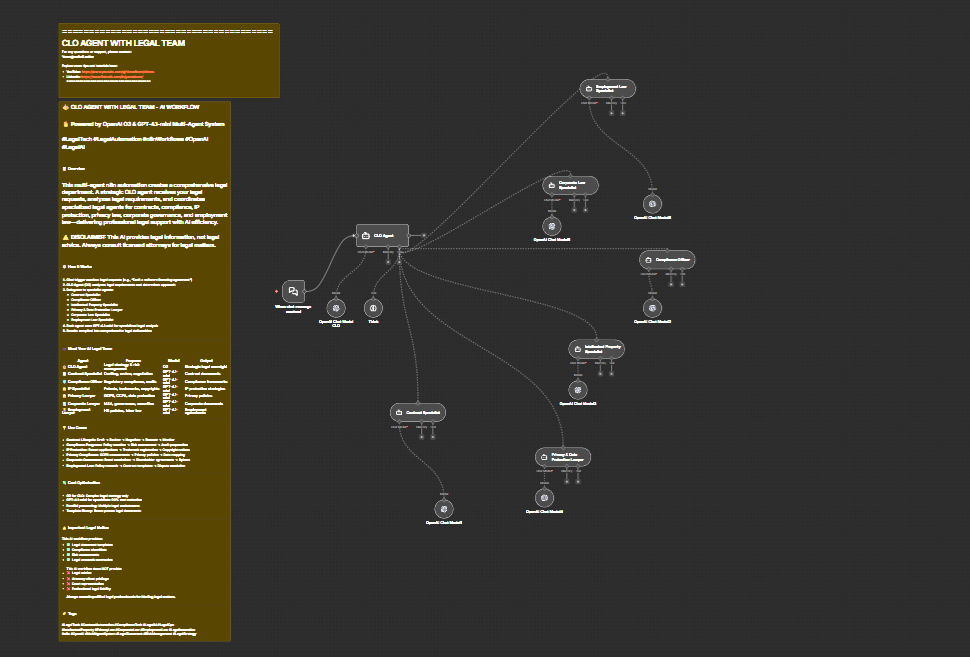
Discover how legal workflow automation helps law firms automate client intake, billing, docketing & contract review. Boost revenue 52% with n8n integrations.
If you run a law firm, whether you're a solo practitioner juggling 40 active matters or a legal ops director managing a team of 50, you already know that the practice of law is only part of the job. The other part? An endless stream of administrative tasks that eat into your billable hours, strain your staff, and quietly leak revenue every single day.
Consider this: only 33% of law firms respond to new client emails, according to Clio's 2024 Legal Trends Report. That means two out of every three potential clients who reach out to a law firm never hear back. At the same time, firms that implement intake automation report 51% more leads and 52% higher revenue. That's not a marginal improvement, that's a structural competitive advantage.
The problem isn't that lawyers don't care about clients or deadlines or billing. The problem is that most law firms are still running 21st-century legal work on 20th-century operational infrastructure. Forms get emailed manually. Deadlines get entered into calendars by hand. Invoices go out late because someone forgot to log their time. Follow-up emails for outstanding balances either don't happen or happen inconsistently.
Legal workflow automation changes this. Not by replacing lawyers, but by handling the repetitive, rule-based, time-sensitive operational work that shouldn't require a JD in the first place.
This post walks through the four most painful operational bottlenecks in law firms today, client intake, billing and collections, docketing and deadlines, and contract review, and shows you exactly how automation addresses each one. Then we'll introduce the tool that makes it all possible without requiring an IT department or a six-figure software budget.
1. Client Intake: The Revenue Leak Nobody Talks About
Client intake is the front door of your law firm. It's where potential clients first interact with your brand, share their legal problem, and decide whether to trust you with their matter. And for most law firms, that front door is broken.
Here's what broken intake looks like in practice:
- A potential client fills out a contact form on your website at 9:30 PM on a Thursday.
- Your receptionist sees it Friday morning and sends it to the right attorney.
- The attorney reads it Friday afternoon and asks the paralegal to send an intake form.
- The paralegal sends the form Monday morning.
- The client already retained someone else on Saturday.
This scenario plays out dozens of times every month at law firms across every practice area. Speed-to-response is the single most important factor in whether a prospect becomes a client, and most firms are structurally incapable of responding fast enough because every step in the process requires a human to hand off work to another human.
Automated intake workflows solve this by collapsing the entire process into minutes, not days.
Here's what an automated intake workflow looks like:
- A prospect submits a form (via Typeform, your website, or a dedicated intake portal).
- Within seconds, the prospect receives a personalized acknowledgment email.
- Their information is automatically logged in your practice management system (Clio, MyCase, or similar).
- A conflict-check query is triggered against your existing client database.
- If no conflict is found, a Calendly link is automatically sent to schedule a consultation, no staff involvement required.
- The intake details are routed to the appropriate attorney or practice group based on matter type, jurisdiction, or other criteria you define.
- If the prospect doesn't book within 24 hours, an automated follow-up goes out.
Every one of these steps can be triggered automatically, run overnight, and operate on weekends and holidays. Your intake process works 24/7 even when your office doesn't.
Beyond speed, automation also addresses the consistency problem. When intake depends on individual staff members, you get inconsistent data collection, missed fields, and forms that vary based on who handles the intake. Automated workflows enforce a standardized process every single time, which means cleaner data, better conflict checks, and more complete matter records from day one.
For firms that rely on high-volume intake, personal injury, immigration, family law, criminal defense, this isn't a nice-to-have. It's the difference between a profitable firm and one that's perpetually understaffed and overwhelmed.
2. Billing and Collections: The Money You're Already Owed But Haven't Collected
Legal billing is where law firm profitability either gets realized or silently evaporates. Most attorneys understand this in the abstract, but the operational reality of billing is messy, manual, and deeply inconsistent across most firms.
The billing problem exists at three distinct stages:
Stage 1: Time Capture Lag Attorneys are notoriously bad at logging time contemporaneously. Research consistently shows that the longer the gap between doing work and recording it, the more time goes unrecorded. An attorney who reconstructs their day at 5 PM will capture less billable time than one who logs it in real time, and an attorney who tries to reconstruct last Tuesday's work on Friday will capture even less. Over the course of a year, this lag can represent tens of thousands of dollars in unbilled, uncaptured work.
Automation can't force an attorney to log time, but it can dramatically lower the friction. Automated prompts triggered by calendar events, email activity, or document access can remind attorneys to log time immediately after a call, a meeting, or a filing, dramatically reducing the gap between work and recording.
Stage 2: Pre-Bill Review Bottlenecks Before invoices go to clients, most firms run a pre-bill review process, partners review draft bills, make adjustments, and approve them for sending. In many firms, this process is entirely manual: bills are generated, printed or PDFed, emailed to partners, marked up, returned, revised, and then sent. It's slow, it's inconsistent, and it delays the billing cycle by days or weeks.
Automated workflows can route pre-bills to the appropriate reviewer based on client, matter type, or billing attorney, and automatically escalate if the review hasn't been completed within a set timeframe. No more bills sitting in someone's inbox for two weeks because they forgot.
Stage 3: Collections Follow-Up This is where the most money walks out the door. Most firms send an invoice and then... wait. If the client doesn't pay, a staff member eventually notices and sends a follow-up. Or doesn't. The inconsistency in collections follow-up is one of the primary reasons law firm realization rates, the percentage of billed time that's actually collected, hover well below 100%.
Automated collections workflows change this entirely. Once an invoice goes unpaid past a defined threshold (say, 30 days), an automated reminder goes out. At 45 days, a second reminder. At 60 days, the matter is flagged for personal outreach. These workflows can integrate directly with your billing platform (LawPay, Clio Payments, etc.) and stop automatically once payment is received.
None of this requires a collections department. It just requires a workflow that runs in the background and does exactly what your best billing coordinator would do, consistently, every time, with no days off.
3. Docketing and Deadlines: The Risk You Can't Afford to Take Manually
Of all the operational risks in a law firm, missed deadlines are the most dangerous. A missed statute of limitations. A forgotten response deadline. A filing that was due on a Monday but didn't get calendared because the docketing clerk was out sick on Friday.
Malpractice claims related to missed deadlines are among the most common and most costly in the legal profession. And yet, in most firms, the docketing process is still largely manual.
Here's the typical manual docketing workflow:
- An attorney receives a court order or filing confirmation.
- The attorney (or their assistant) reads the order and identifies the relevant deadlines.
- Those deadlines are manually entered into the practice management system and/or the attorney's personal calendar.
- Reminders are set, if anyone remembers to set them.
- Jurisdiction-specific rules (like local rules that adjust deadlines based on the method of service) are applied, if the person doing the docketing knows them.
Every one of these steps is a failure point. Human beings misread dates. They forget to calendar entries. They don't know every jurisdiction's local rules. They get sick, go on vacation, or leave the firm.
Automated docketing workflows can trigger deadline calculations the moment a filing or order is received, pulling dates directly from documents, cross-referencing jurisdiction-specific rules, and populating calendars in your practice management system automatically. Multiple reminders can be set at predefined intervals, 30 days out, 14 days out, 7 days, 48 hours, all without a human being touching a calendar entry.
When a new matter is opened, automation can also trigger a standard set of jurisdiction-specific deadline rules to be pre-populated, ensuring that every matter starts with the right docket framework in place.
For litigation-heavy practices, this isn't just an efficiency play. It's a risk management strategy. Automated docketing creates a consistent, auditable, defensible record of how deadlines were identified, calculated, and monitored, which matters enormously if a deadline is ever challenged.
4. Contract Review and Management: Scaling the Work Without Scaling the Headcount
Contract review has always been one of the most labor-intensive aspects of legal work. But as companies transact at greater volume and speed, the demand on legal teams to review, abstract, and track contracts has grown faster than any firm or in-house team can reasonably staff.
The pain points in contract management fall into several categories:
Manual Clause Extraction Reviewing a contract to find the governing law clause, the limitation of liability, the termination provisions, and the renewal dates requires a trained eye, but it's still largely mechanical work. When done manually across dozens or hundreds of contracts, it's slow, inconsistent, and expensive.
Playbook Drift Most legal teams maintain a contract playbook, a set of fallback positions, acceptable deviations, and escalation triggers for key clauses. But when contracts are reviewed manually by different attorneys over time, playbook adherence becomes inconsistent. One attorney accepts a limitation on liability that another would have pushed back on. Without systematic tracking, you don't even know it's happening.
Bulk Abstraction Bottlenecks For firms or legal ops teams that need to abstract large volumes of contracts, due diligence reviews, lease portfolios, vendor agreement audits, manual abstraction is simply not scalable. A paralegal can review 15-20 contracts per day. A portfolio of 500 contracts means weeks of work, significant cost, and meaningful risk of inconsistency.
Automation addresses all three of these problems:
- Automated clause extraction workflows can process an uploaded contract, identify key clauses, and populate a standardized abstraction template, in seconds rather than hours.
- Playbook comparison workflows can flag deviations from standard positions and route flagged provisions to the appropriate reviewer automatically.
- Bulk abstraction pipelines can process entire contract portfolios overnight, delivering structured data into a spreadsheet, Airtable base, or contract management system, ready for attorney review in the morning.
As Wolters Kluwer's research notes, 68% of legal professionals are already using generative AI weekly, but most are doing it in a disconnected, ad-hoc way. They're pasting contract language into ChatGPT, getting analysis back, and then manually copying results somewhere else. Automation connects those AI capabilities to your actual workflows, so the output lands in the right system, in the right format, every time.
How n8n Connects Your Legal Tech Stack, Without the Enterprise Price Tag
At this point, you might be thinking: this all sounds great, but we're a law firm, not a technology company. We don't have developers. We don't have an IT department. We can't afford enterprise automation software.
This is exactly where n8n changes the equation.
n8n is an open-source, self-hostable workflow automation platform that lets you build powerful, multi-step automation workflows by connecting the tools you already use, without writing code. Think of it as the operational infrastructure layer that sits between your legal software tools and makes them actually talk to each other.
Here's why n8n is particularly well-suited for law firms:
It connects your entire legal tech stack. n8n has native integrations with Clio, MyCase, DocuSign, Calendly, Outlook, Gmail, Slack, Google Drive, Typeform, LawPay, Airtable, and dozens of other tools that legal teams already use. If your tool has an API, n8n can connect to it.
It's self-hostable, which matters for legal. Law firms have ethical obligations around client data. Unlike cloud-only automation platforms where your data flows through a third-party's servers, n8n can be deployed on your own infrastructure, keeping client information where it belongs, under your control.
It's built for non-developers. n8n's visual workflow builder lets you construct complex multi-step workflows using a drag-and-drop interface. You don't need to write code to build an intake workflow that connects Typeform to Clio to Gmail to Calendly. You just connect the nodes.
It can incorporate AI natively. n8n includes built-in AI nodes that let you connect to OpenAI, Anthropic, and other AI providers, meaning you can build workflows that extract contract clauses, summarize documents, or draft follow-up emails using AI, all within a single automated pipeline.
Real examples of what law firms are building with n8n:
- Intake automation: Typeform submission → Clio matter creation → conflict check → Calendly consultation link → Gmail confirmation, all within 60 seconds of form submission, 24/7.
- Billing reminders: LawPay invoice status → if overdue 30+ days → send Gmail reminder → log follow-up in Clio → Slack notification to billing coordinator.
- Deadline alerts: New Clio matter → trigger deadline calculation workflow → create calendar entries in Clio and Google Calendar → set Slack reminders at 30/14/7 day intervals.
- Contract abstraction: DocuSign envelope received → extract document → AI clause analysis → populate Airtable abstraction template → Slack notification to reviewing attorney.
- Document management: Signed DocuSign document → auto-file to correct Google Drive folder → update matter status in Clio → notify client via Gmail.
None of these require a developer to build. They require a clear understanding of your process and a few hours with n8n's visual builder, or a pre-built template you can adapt in minutes.
The cost comparison matters too. Enterprise legal automation platforms can cost $50,000-$200,000+ per year. n8n's self-hosted version is open source and free. The cloud version starts at a fraction of the cost of proprietary alternatives. For small and mid-size firms, this cost structure is transformative.
The Firms That Automate Now Will Define the Next Decade
The legal profession is in the middle of a structural shift. Clients expect faster responses, more transparent billing, and greater value per dollar. AI is changing what's possible in document review, legal research, and contract analysis. And the operational gap between firms that have modernized their workflows and those that haven't is widening every year.
The data is unambiguous: firms that automate their intake see 51% more leads and 52% higher revenue. Firms that systematize their billing and collections see higher realization rates and shorter collection cycles. Firms that automate their docketing reduce malpractice risk. Firms that build contract abstraction pipelines can serve more clients without hiring more staff.
This isn't about replacing lawyers. It's about freeing lawyers, and paralegals and legal ops professionals, to do the work that actually requires their judgment, training, and expertise. The intake form doesn't need a JD. The billing reminder doesn't need a paralegal. The calendar entry doesn't need an attorney.
Workflow automation handles the mechanical work. Your team handles the legal work. That's the model that wins.
Ready to Automate Your Law Firm? Start Here.
If you're ready to stop losing leads to slow intake, stop leaving billed work uncollected, stop manually entering deadlines, and start leveraging AI in your contract workflows, the next step is simple.
Register for free to explore pre-built legal automation workflows designed specifically for law firms, solo practitioners, and legal ops teams. You'll find ready-to-use templates for client intake, billing reminders, docketing automation, contract review pipelines, and more, all built on n8n and designed to connect the tools your firm already uses.
You don't need to build from scratch. You don't need a developer. You just need to decide that the way your firm operates today doesn't have to be the way it operates tomorrow.
The firms automating now are the ones clients will choose next year. Start building your advantage today at n8nme.com.
Interested in a specific workflow? Browse templates for Clio automation, DocuSign workflows, legal intake automation, and law firm billing automation at n8nme.com.